| Delphi Clinic | C++Builder Gate | Training & Consultancy | Delphi Notes Weblog | Dr.Bob's Webshop |
 |
 |
 |
| Delphi Clinic | C++Builder Gate | Training & Consultancy | Delphi Notes Weblog | Dr.Bob's Webshop |
|
|
|
| ||||||

Quick compile, debug, and run
When we are working in JBuilder projects, we most often have got a couple of source files in our project.
And during development, we often have to compile, debug or run our classes.
We can use the different menu options from the Build and Run menu items.
But we can use a quicker way to achieve the same goals: the right mouse button click!
If we click with the right mouse button on a Java source file, which isn't runnable, we get the following popup menu:
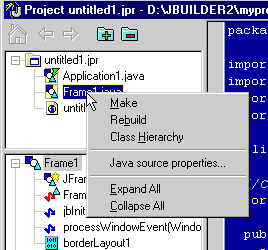
We can use the Make and Rebuild options to make or rebuild the selected source file.
If we click with the right mouse button on a Java source file, which is runnable, we get the folloing popup menu:
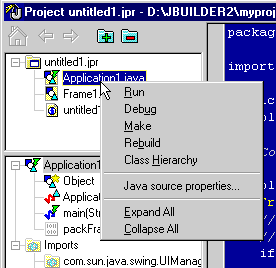
We can use the Run, Debug, Make and Rebuild options to run, debug, make or rebuild the selected source file.